ChatGPT Business Hub: What Is It & How Do You Get Your Business Listed?

On 10 November 2026, OpenAI introduced Business Hub, giving eligible businesses a new way to claim their profile, manage their information and understand how customers discover them through ChatGPT.
For UK businesses, this introduces another opportunity to manage their online presence as AI-powered search continues to develop. However, not every business is eligible yet, and claiming a profile doesn't guarantee more recommendations.
In this guide, we'll explain how ChatGPT Business Hub works, which UK businesses can use it, how to claim and optimise your profile, and what it means for your wider SEO strategy.
What Is ChatGPT Business Hub?
ChatGPT Business Hub lets businesses manage how their organisation is represented within ChatGPT and see how people discover and engage with them on the platform.
Its main features include:
- Claim Your Business: Search for an existing business profile or, where available, create a new one and verify your connection to the organisation.
- Manage Business Information: Update your website, business description, category, logo and other profile details.
- Access Business Insights: View aggregated data on mentions, website clicks and the topics people associate with your business.
- Connect Product Feeds: Businesses selling products can share descriptions, pricing and availability through a product feed.
Business Hub is separate from ChatGPT Business, a paid workspace subscription for teams. It's also different from Business Agents, which lets some US ecommerce and online service businesses offer customers AI-powered conversations based on their products and policies.
Can UK Businesses Use ChatGPT Business Hub?
Some can. Business Hub is still in beta, and what you can do depends on your location and business type:
- Online businesses: If you have a website, you may be able to create a new profile if one doesn't already exist.
- Local shops and restaurants: OpenAI currently limits claiming these listings to existing US profiles, so UK businesses in these categories may not be able to claim or create one yet.
You don't need an advertising account or a ChatGPT Enterprise agreement to claim a profile. As the feature is still developing, availability may change. The quickest way to check is to open Business Hub and see which options it offers you, or read OpenAI's Business Hub setup guidance.
What if Your Business Isn't Eligible Yet?
If Business Hub doesn't currently support your business, you can still improve how your organisation is represented online. Keep your website and business listings accurate, publish useful content, and maintain consistent information across relevant platforms. These activities remain valuable regardless of whether you can claim a ChatGPT profile.
Why Is ChatGPT Business Hub Important for Businesses?
ChatGPT is becoming another channel through which potential customers find businesses, so it's worth knowing how yours appears there.
Business Hub helps in three ways:
- More control over how you're represented: Claiming your profile lets you provide information directly to OpenAI, rather than relying on what ChatGPT picks up elsewhere.
- A clearer view of discovery: Insights show how often your business is mentioned, how many people click through to your website, and which topics lead them to you.
- Preparation for the growth of AI search: As AI tools become a more established part of the customer journey, it makes sense to consider how your wider online presence appears on these platforms.
How To Set Up Your Business on ChatGPT
Setting up your business on ChatGPT involves two verification stages. First, you'll need to confirm your connection to the business and have your claim approved by OpenAI. You'll then need to complete an identity check through Persona before you can manage your profile and access Insights.
Before starting, make sure you have your business details, access to your website or business contact information, and a form of government-issued identification.
1. Sign in & Open Business Hub
Sign in to your ChatGPT account and open Business Hub from the sidebar.
2. Find or Create Your Business Profile
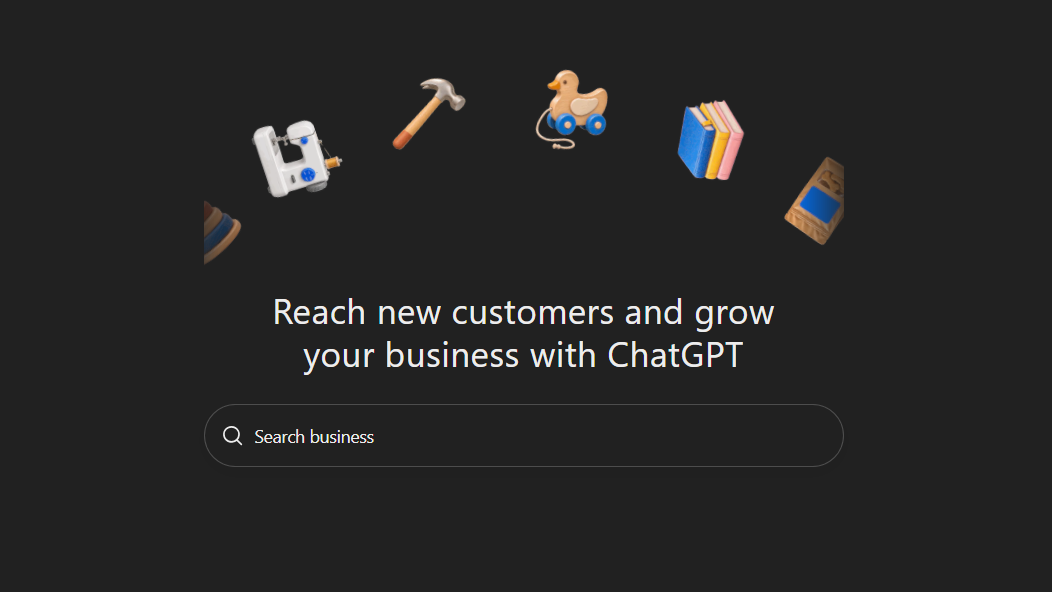
Search for your business name and select the matching listing, checking the details carefully.
If your business doesn't appear, you may be able to create a new profile, depending on your business type and eligibility.
3. Verify Your Connection to the Business
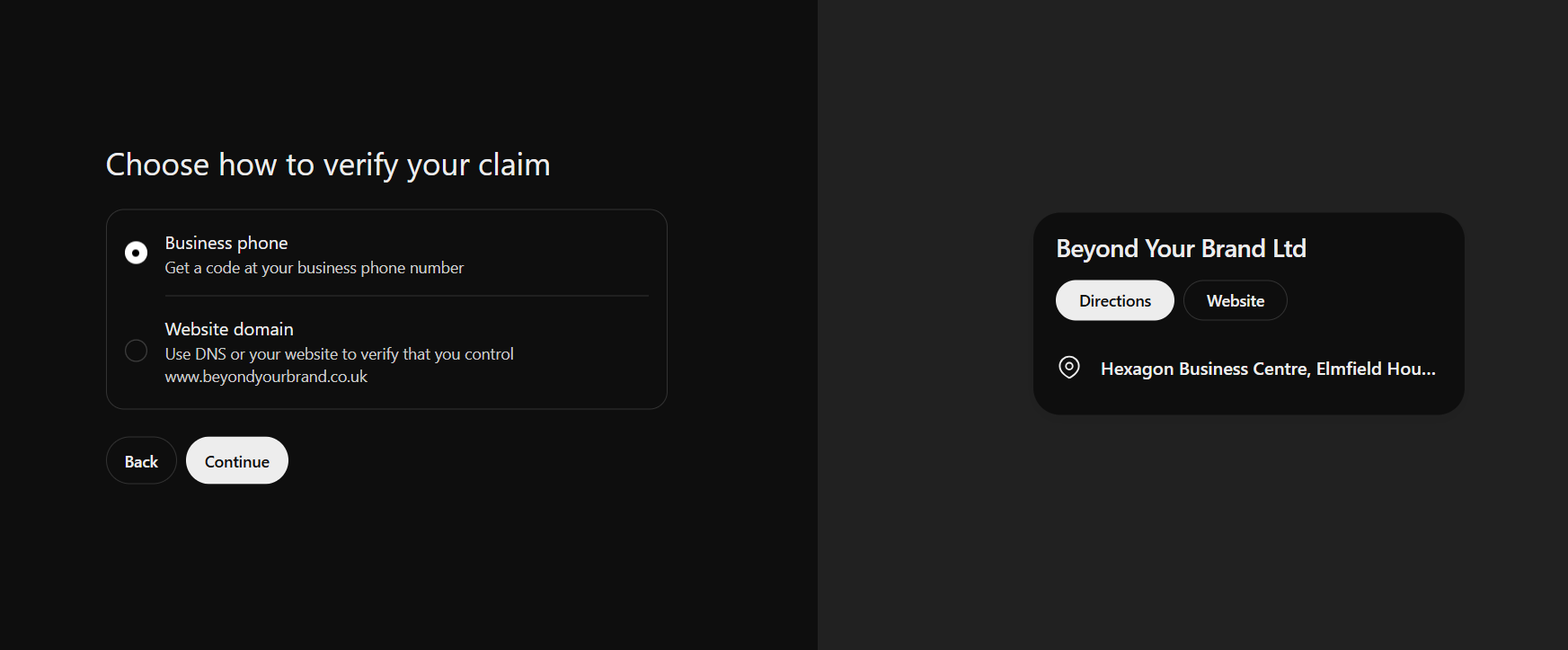
Choose one of the verification methods available for your listing, such as:
- Business Phone: Receive a code by text message or automated call.
- Business Email: Receive a code at an email address associated with your organisation.
- Website Domain: Add a DNS TXT record to your domain settings to confirm your connection to the website. Your web developer or domain provider can help with this.
- Shopify: Connect your Shopify store, if you're an eligible merchant.
4. Wait for Your Claim to Be Approved
Once you've submitted your claim, OpenAI will review it and email you with its decision. You may be asked to provide additional information before approval is granted.
5. Complete Identity Verification With Persona
Once your business claim is approved, you'll need to complete an additional identity check through OpenAI's verification provider, Persona.
Open your business profile in Business Hub, select the Persona verification option and follow the instructions. You may need to provide government-issued identification, business registration details and evidence that you're authorised to represent the organisation.
OpenAI will notify you once your identity verification has been reviewed and approved.
6. Manage & Optimise Your Business Profile
Once both verification stages have been approved, you can update your business information, access Insights, and connect a product feed if applicable.
Your profile will also receive a verified badge. Remember that OpenAI reviews changes to business information, so updates may not appear immediately.
Setting Up Your Business on ChatGPT
How to Optimise Your ChatGPT Business Profile
Once you're verified, review your profile to make sure it tells customers clearly what you offer and where to find out more:
- Check your core details: Make sure your business name, website, and contact details are accurate.
- Choose the right category: Pick the one that best describes your products or services.
- Write a clear description: Summarise what you do, who you help and what you offer, using the words your customers use rather than generic marketing language.
- Add your logo and images: Clear, recognisable branding helps customers identify you.
- Stay consistent: Match your details to your website and other online profiles to avoid conflicting information.
Connect a Product Feed
If you run an ecommerce business, you can connect a product feed to share descriptions, pricing, and availability. OpenAI supports CSV uploads, hosted feed URLs, and Shopify integrations. Keeping this up to date gives ChatGPT accurate details when people research or compare products.
How to Track Your Business Performance in ChatGPT
Once your business profile has been verified, you can use the Insights section of Business Hub to understand how people are discovering and engaging with your business through ChatGPT.
It provides three main metrics:
- Mentions: How often ChatGPT references your business's website or displays its local business listing.
- Website Clicks: The number of times people click through to your website from ChatGPT.
- Discovery Topics: Common subjects and themes in ChatGPT responses that mention or cite your business.
The data is aggregated over the previous 28 days, so you'll see broad patterns rather than individual conversations. Review it regularly and compare website clicks with your own analytics to see how much traffic ChatGPT sends you and which topics drive interest.
Important: Business Hub Insights don't capture every reference to your business. For online businesses, mentions are counted when ChatGPT references your website, and reporting may be limited where activity doesn't meet OpenAI's data thresholds. As a result, these figures should be treated as an indicator of visibility rather than a complete record of every time ChatGPT recommends your business.
Does ChatGPT Business Hub Help With SEO?
Claiming your ChatGPT Business Profile won't directly improve your Google rankings or guarantee that your business appears more frequently in AI-generated recommendations.
However, Business Hub gives eligible organisations another way to provide accurate information about their business. Combined with a well-optimised website, helpful content, and a consistent online presence, it can form part of a wider strategy for improving visibility across traditional and AI-powered search.
Alongside Business Hub, focus on:
- Keep Business Information Consistent: Make sure your business name, contact details, services, and website information are accurate across your website, directories, and other online profiles.
- Maintain a Well-Structured Website: Organise your pages clearly and provide straightforward information about your business, products and services.
- Create Helpful Content: Publish relevant content that answers customer questions and provides useful information about the topics they search for.
- Build a Trustworthy Online Presence: Encourage genuine customer reviews and seek relevant coverage, mentions, and links from reputable websites.
- Monitor AI Search Visibility: Use Business Hub Insights alongside traditional SEO tools and website analytics to understand how people are discovering your business.
Business Hub should complement your existing marketing activity, not replace it. A well-optimised website, accurate Google Business Profile, and useful content remain important parts of building a strong online presence.
Improve Your Business's Visibility Across Search Engines & AI
Claiming your ChatGPT Business Profile is a useful starting point, but it's only one part of building a strong online presence.
At Beyond Your Brand, we help businesses improve their visibility across traditional search engines and AI-powered platforms through tailored SEO strategies, content optimisation, and technical website improvements.
We can help you understand how your business currently appears in AI-generated search results, identify gaps in your online presence, and develop a strategy to improve your visibility where your customers are searching.
Want to strengthen your visibility in Google and AI search? Get in touch with our team to discuss how we can help!
FAQs
-
Is ChatGPT Business Hub free?
OpenAI does not currently list a charge for claiming an eligible business profile or accessing Business Hub. You also don't need an advertising account or a ChatGPT Enterprise subscription to claim your business.
-
Can UK businesses get listed on ChatGPT?
Some UK businesses may be eligible, depending on their business type and the verification options available. However, local shops and restaurants can currently only claim existing US listings. Eligible online businesses may be able to create a new profile.
-
Do I need a website to get my business listed on ChatGPT?
OpenAI's initial claiming process is aimed at eligible businesses with a website. You'll also need to verify your connection to the organisation using one of the methods offered in Business Hub.
-
Will claiming my business improve my SEO rankings?
No, claiming a profile does not directly improve your Google rankings or guarantee that ChatGPT will recommend your business more often. It gives you a way to manage the information associated with your organisation, but your wider SEO and online presence remain important.
-
Can I let my SEO agency manage my ChatGPT Business Profile?
Yes, once your business has been claimed, the administrator can invite team members or grant an agency access to manage the profile through Business Hub.
Your agency will need to use its own ChatGPT account, and access may depend on your organisation's workspace settings. This means you can get professional support with managing and optimising your profile without sharing your login details.
-
What is the difference between ChatGPT Business and Business Hub?
ChatGPT Business is a paid subscription for teams that need a shared workspace and business-focused features. Business Hub is designed for organisations that want to manage their business information and understand how they appear in ChatGPT.
-
Can I see how many people find my business through ChatGPT?
Yes, once your claim and Persona identity verification have been approved, Business Hub Insights provides aggregated data covering the previous 28 days. This includes business mentions, website clicks, and common discovery topics, but it doesn't show individual user prompts or conversations.
-
Can I add multiple business locations to ChatGPT?
Each business profile needs to be managed separately. Claiming your main business profile does not automatically claim its other locations, so you'll need to check whether separate listings are available for each one.
-
What happens if someone else has already claimed my business on ChatGPT?
If your business has already been claimed, you can request ownership through Business Hub.
Open the existing business profile, select the three-dot menu, and choose Dispute ownership. You'll then be guided through a verification process using Persona to confirm that you're authorised to represent the business.
If you encounter difficulties, contact OpenAI Support for assistance.

